A couple of weeks ago, Anthropic announced Claude Design, and the immediate reaction was exactly what you would expect. Big hype, big promises, and a lot of people saying it was going to wipe out tools like Figma and Stitch.
But once people actually started using it, a few problems showed up pretty quickly.
The biggest one was usage limits. The second was lock-in. If you want the experience, you are pushed straight into Anthropic’s ecosystem. And if you are not already living inside that stack every day, that can get annoying fast.
That is why Open Design caught my attention.
It is basically an open source, local-first alternative to Claude Design. It runs on your own computer, connects to the coding agents and CLIs you already use, and gives you a lot of the same AI-assisted design workflow without forcing you into a single provider or subscription model.
Table of Contents
- Why Open Design is interesting right now
- What Open Design actually does
- The setup is refreshingly simple
- You are not locked into one model ecosystem
- Building a website concept with Open Design
- It does more than generate a page mockup
- The output: not magic, but genuinely useful
- The examples library is worth exploring
- Where it still feels early
- Why I would use this over Claude Design right now
- Who Open Design is best for
- FAQ
Why Open Design is interesting right now
Open Design has already picked up a ton of momentum, with tens of thousands of GitHub stars in a very short time. That alone tells you people were looking for this exact thing.
The appeal is pretty simple:
- It is local-first, so it runs on your machine instead of in a locked cloud environment.
- It supports multiple agent backends, not just one vendor.
- You can bring your own key if you want to connect APIs directly.
- It includes built-in skills for tasks beyond just basic UI mockups.
- It avoids the frustrating product limits that make some AI design tools feel half-usable.
That last point matters more than people admit. If a tool lets you generate one design system and then effectively tells you to come back next week, that is not really a workflow. That is a demo.
What Open Design actually does
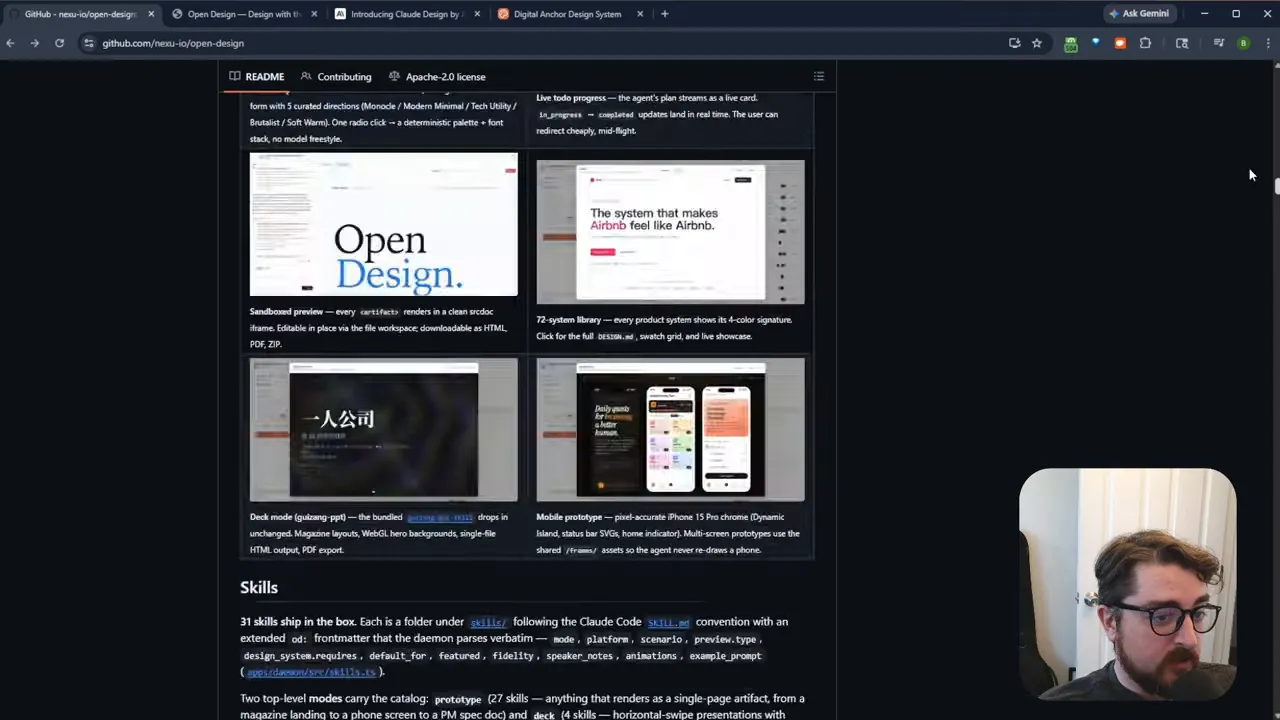
Open Design is not just a prompt box that spits out pretty screenshots. It is designed to generate real, editable outputs and work more like a design generation environment.
From the project site and GitHub examples, it can help create:
- Landing pages
- Multi-page websites
- Mobile app concepts
- Slide decks
- Design systems
- Images, video, and audio prompts
- HTML-based prototypes
It also comes with built-in “skills,” which is one of the cooler parts of the project. Instead of starting from zero every time, you get preloaded workflows for things like blog post creation, critique, email marketing, slide deck creation, design systems, image prompting, video prompting, and more.
That makes it feel less like a raw dev tool and more like a practical creative workspace.
The setup is refreshingly simple
You can install Open Design a couple of ways. If you like the terminal, you can clone the repo and run it from there. But the easiest path is just downloading the desktop release. There are executable builds for Mac and Windows, which makes getting started way easier than a lot of open source projects.
Under the hood, it runs with Node and SQLite, and it includes a daemon for the app itself. The important part is not the architecture details, though. The important part is that it runs locally and does not require you to buy into a separate cloud design subscription just to use it.
Once installed, the app feels familiar right away if you have tried Claude Design. You create a project, choose whether you want a wireframe or a high-fidelity result, and then connect the model or CLI you want to use.
You are not locked into one model ecosystem
This is where Open Design really separates itself.
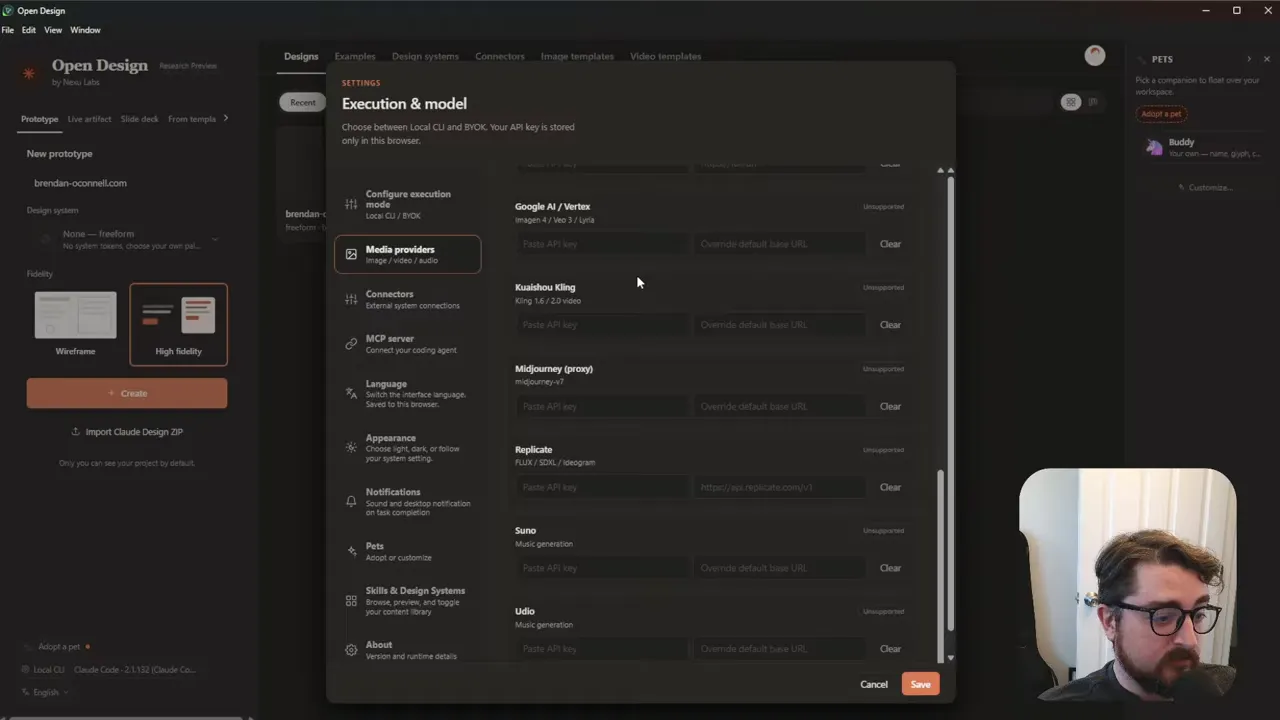
It can automatically detect local tools you already have installed. In my case, it picked up Claude Code immediately without me having to configure anything. If you use Codex, Cursor, Gemini, OpenCode, or other compatible CLIs, those can plug in too. And if you prefer API access, you can just bring your own key.
That flexibility is a huge deal.
Instead of a design tool dictating what model you use, how much you can use it, and what ecosystem you need to belong to, Open Design flips that around. You choose the agent. You choose the provider. You choose how you want to run it.
It also supports additional media providers for things like:
- Speech and voice cloning
- Video generation
- Image generation
- Audio workflows
There are connectors for Composio and MCP as well, plus MCP server support, language switching, appearance controls, and a handful of quality-of-life features that make the tool feel surprisingly complete for such a new project.
Building a website concept with Open Design
To test it, I created a simple project for my own site and gave it a pretty straightforward prompt.
The prompt focused on a homepage for BrennanEvano.com, centered around WordPress, agentic coding, development best practices, headless WordPress, and the Cloudflare stack. Nothing especially fancy. Honestly, not even a great prompt. Just enough direction to see how the tool thinks.
After that, Open Design walked through a short briefing process. It asked what kind of page I wanted, whether it should be a single landing page or something larger, what visual style to follow, and whether it should pull in current site design cues.
That flow is helpful because it turns vague prompting into a more guided design brief. Even if you start with a weak prompt, the app nudges you toward a better result.
In my case, I chose:
- A single landing page
- Audience: prospective clients
- A modern minimal aesthetic, similar to Linear or Vercel
- Matching the current design of my website
- Realistic placeholder content
From there, the agent got to work.
It does more than generate a page mockup
One thing I liked is that Open Design does not just throw out a flat visual and call it a day. It builds context as it goes.
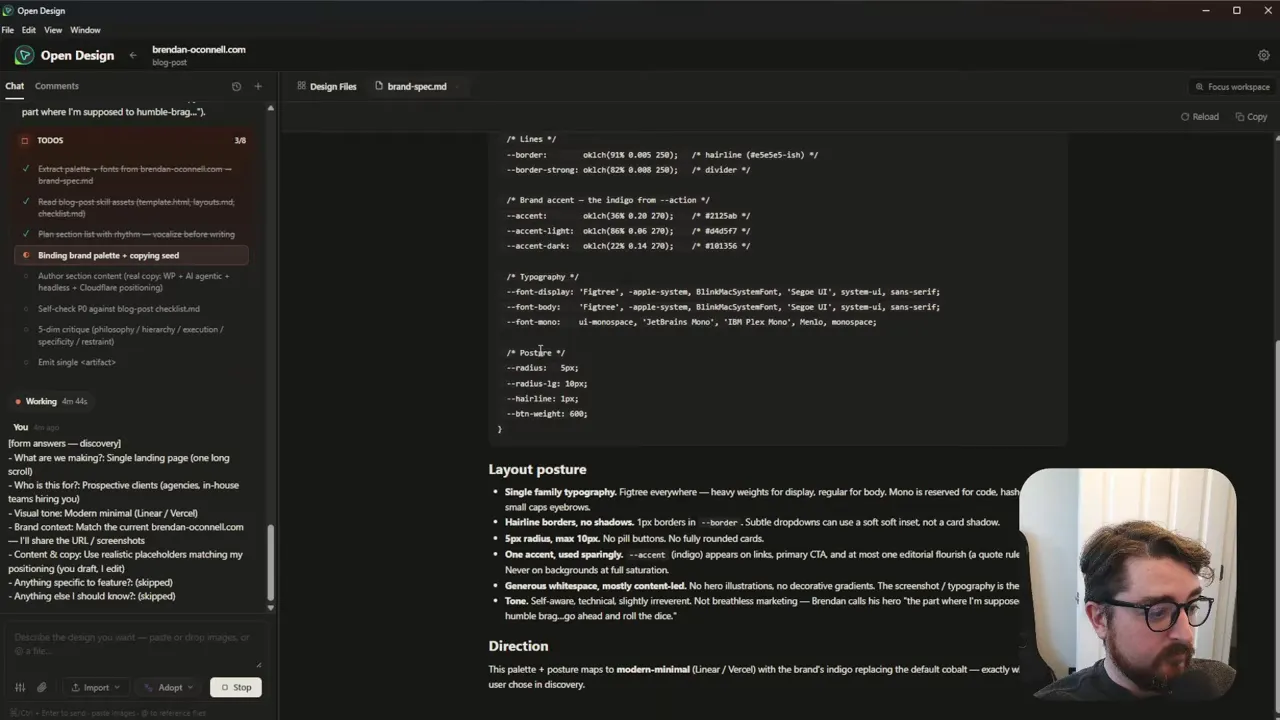
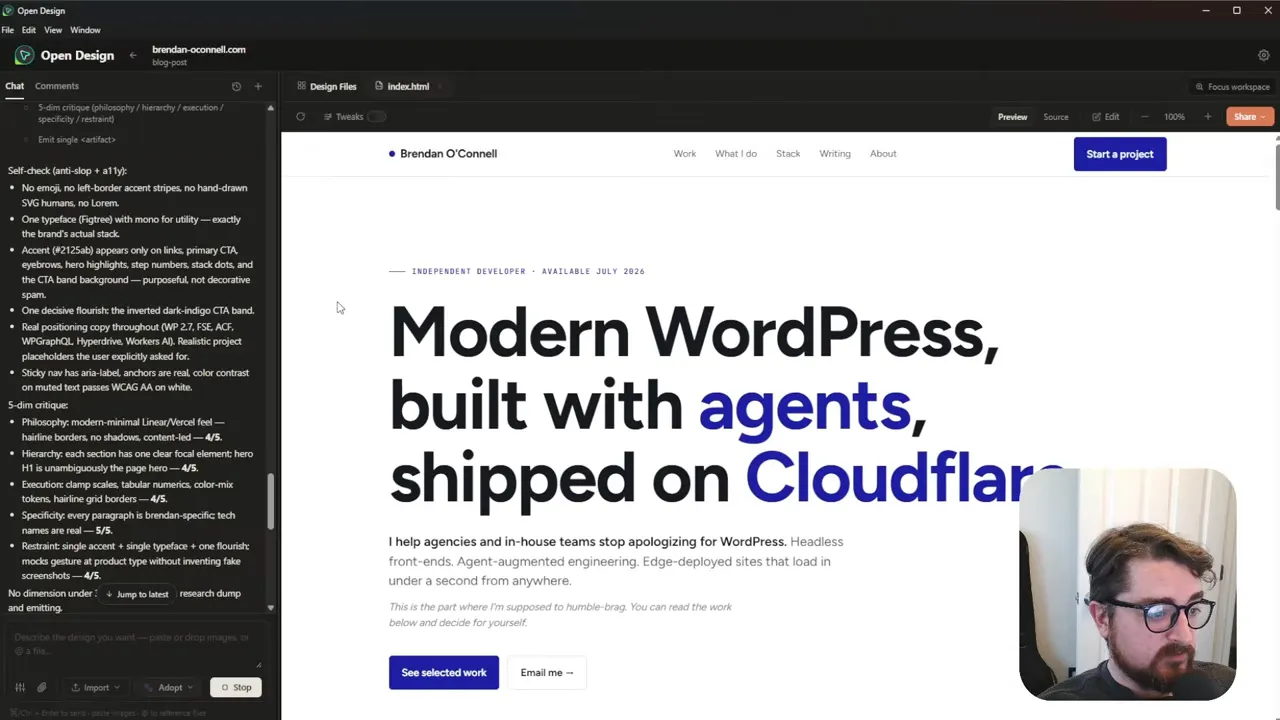
It was able to fetch details from my existing site and create supporting files like a brand spec and design documentation. It picked up the font I was already using, recognized some of the color choices, and even inferred stylistic preferences from the site.
For example, it identified design tendencies like:
- Using Figtree as the typeface
- Keeping accent color usage fairly restrained
- Favoring generous white space
- Avoiding overhyped, breathless marketing language
That last one made me laugh, but it was also a good sign. It means the system was not just scraping styles. It was also trying to understand voice and positioning.
As it generated, it built out files, tabs, specs, and page assets step by step. It takes a little time, which is expected, but the process feels more grounded because you can actually see what it is creating.
The output: not magic, but genuinely useful
The final result was a clean one-page site concept that blended my existing branding with some smarter presentation choices.
It pulled in my blue color palette. It reused the Figtree font. It kept the general tone and some of the tagline style from my current site. Then it layered in fresh copy and a more polished structure around topics like agentic development, headless WordPress, Cloudflare, and recent projects.
Was it perfect? No.
There were some odd details, like inventing a location for me that was completely wrong. And yes, some AI-generated design work still has that slightly “AI-made” look to it. You can feel the pattern sometimes.
But as a starting point, it was solid.
The hover effects were there. The layout made sense. The page had usable sections. The visual system was consistent. And most importantly, it got me to a credible baseline in far less time than staring at a blank canvas would have.
That is really the right way to think about a tool like this. Not as a replacement for taste or judgment, but as a fast way to generate momentum.
The examples library is worth exploring
If you are not sure how to prompt well, Open Design also includes a big set of examples and showcase projects. You can browse by scenario, preview different outputs, and even use those examples as starting prompts.
Some of those projects include full HTML prototypes, not just static mockups. You can inspect them, export HTML, download ZIP files, and in some cases save or record deliverables like PDFs.
There are also design system examples that include editable documentation files, component thinking, and token structures.
So even if you do not use the first generated output directly, the examples are useful for reverse-engineering better prompting patterns and seeing what kinds of results the tool is capable of producing.
Where it still feels early
Open Design is promising, but it is still very new. Some features are clearly marked as coming soon, including things like:
- Uploading Figma files
- Direct GitHub connections
- Pulling web elements more deeply into the workflow
So this is not a finished, mature platform with every bell and whistle already in place. It is a rapidly moving open source project.
That said, it already feels useful now, which is the important part. It does not need to be perfect to earn a spot in the toolbox.
Why I would use this over Claude Design right now
The main reason is simple: freedom.
If I can use my existing Claude Code subscription, or another CLI, or my own API key, and get similar design-generation benefits without tripping over restrictive usage caps, that is a much better deal.
Claude Design might still be interesting as a product direction, but the separate usage constraints make it hard to treat as a serious day-to-day tool. If one basic design system can eat most of your weekly allowance, that is not sustainable.
Open Design removes a lot of that friction. It gives you the same general category of workflow, but keeps you in control of the stack.
Who Open Design is best for
Open Design makes the most sense if you are:
- A developer who wants a fast UI starting point
- A solo creator who needs structure more than pixel perfection
- Someone already using tools like Claude Code, Cursor, or Codex
- Tired of AI product lock-in and arbitrary rate limits
- Interested in open source alternatives that are practical right now
If you are expecting final, agency-grade visual design from a single prompt, you will still need to refine the output. But if you want speed, flexibility, and a useful first draft, it is absolutely worth trying.
FAQ
Is Open Design free to use?
Open Design is open source, and you can run it locally. If you connect paid APIs or external model providers, your costs depend on those services and whatever subscription or API usage you already have.
Does Open Design only work with Claude Code?
No. One of its biggest strengths is that it supports multiple CLIs and providers. Claude Code works with it, but so do other tools like Codex, Cursor, Gemini, OpenCode, and bring-your-own-key setups where supported.
Can Open Design create real HTML output?
Yes. The examples show full HTML-based outputs for certain projects, including websites, mobile concepts, and slide decks. That makes it more useful than a tool that only generates static images.
Is Open Design a complete replacement for Figma?
Not really. It is better thought of as an AI-assisted design generation tool and prototyping aid. It can help you create landing pages, design systems, and structured starting points quickly, but that is different from replacing a mature collaborative design platform outright.
How do you install Open Design?
The easiest option is to download the desktop release for Mac or Windows from the project releases page. If you prefer the command line, you can also clone the repository and run it from there.
Open source alternatives are at their best when they do not just imitate the closed product, but actually improve the experience. Open Design feels like one of those cases.
It is flexible, local-first, surprisingly capable already, and most importantly, it does not trap you inside somebody else’s usage model. If that sounds appealing, this is one of the more interesting AI design tools to try right now.